
.webp)


.webp)




Yamicsoft Windows Manager Review – Optimize, Repair and Speed Up Windows 10/11
Learn about Yamicsoft and its powerful Windows Manager software that helps optimize, clean, and improve the performance of Windows computers.

Yamicsoft is a software developer known for creating powerful system utilities designed to optimize, repair, and enhance the performance of Microsoft Windows computers. With years of experience in system optimization tools, the company focuses on providing reliable software that helps users keep their PCs running smoothly and efficiently.
The flagship product from Yamicsoft is Windows Manager, an all-in-one optimization suite built specifically for modern Windows operating systems. This tool provides a comprehensive collection of utilities designed to clean, tweak, secure, and improve the performance of Windows systems.

What Is Windows Manager?
Windows Manager is a complete system utility designed for Windows 10 and Windows 11. It combines multiple maintenance and optimization tools into a single program, allowing users to manage their system performance easily.
The software offers features that help improve system speed, remove unnecessary files, optimize startup programs, and enhance system security. By analyzing and fine-tuning system settings, Windows Manager helps ensure your computer runs faster and more efficiently.
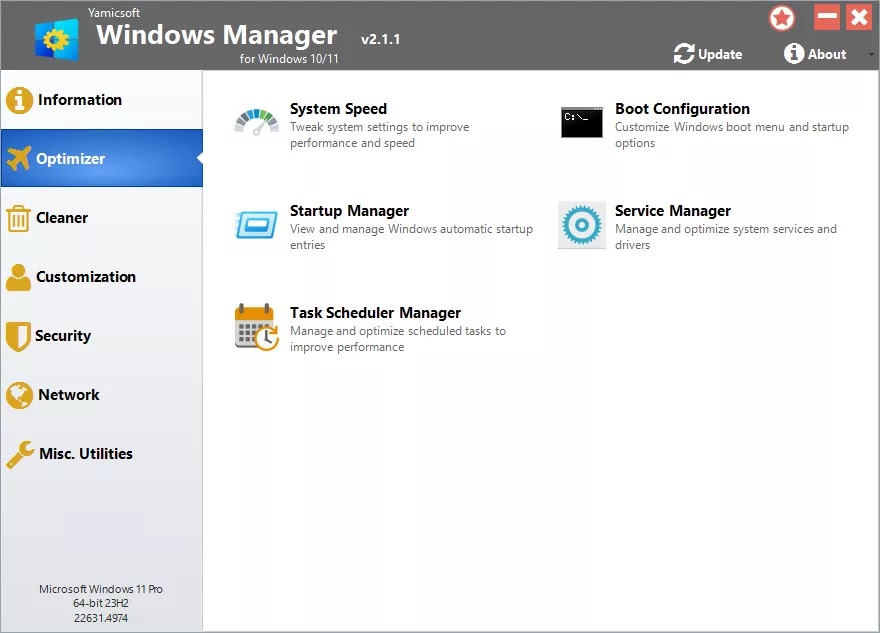
Key Features of Windows Manager
1. System Optimization
Windows Manager can optimize system processes, manage startup programs, and improve system resource usage. This helps increase overall PC speed and responsiveness.
2. Cleaning Tools
The software includes advanced cleaning utilities that remove junk files, duplicate files, and invalid registry entries, freeing up disk space and improving system performance.
3. Repair and Troubleshooting
The built-in Repair Center helps diagnose and fix common Windows issues. Users can resolve system errors, repair permissions, and fix configuration problems with ease.
4. Customization Options
Windows Manager allows users to customize many system components, including File Explorer, taskbar, desktop settings, and context menus, giving users greater control over the Windows experience.
5. Security and Privacy Tools
The software includes features to protect sensitive data, encrypt files, remove privacy traces, and secure important system settings to enhance PC security.
6. Network Optimization
Windows Manager can optimize network settings, manage Wi-Fi connections, and monitor network traffic to help improve internet performance.

Why Choose Yamicsoft?
Yamicsoft focuses on creating easy-to-use software that helps both beginners and advanced users maintain their computers. The company’s mission is to provide stable and reliable tools that enhance system performance, improve security, and reduce the need for constant troubleshooting.
Their utilities are lightweight, regularly updated, and designed to make system maintenance simple and efficient.
What's Your Reaction?
 Like
0
Like
0
 Dislike
0
Dislike
0
 Love
0
Love
0
 Funny
0
Funny
0
 Angry
0
Angry
0
 Sad
0
Sad
0
 Wow
0
Wow
0



%20%E2%80%93%20Complete%20Beginner%20Guide%202026.webp)

